Galaxy Watch 8’s Major One UI 9 Update Arrived With 16+ Improvements
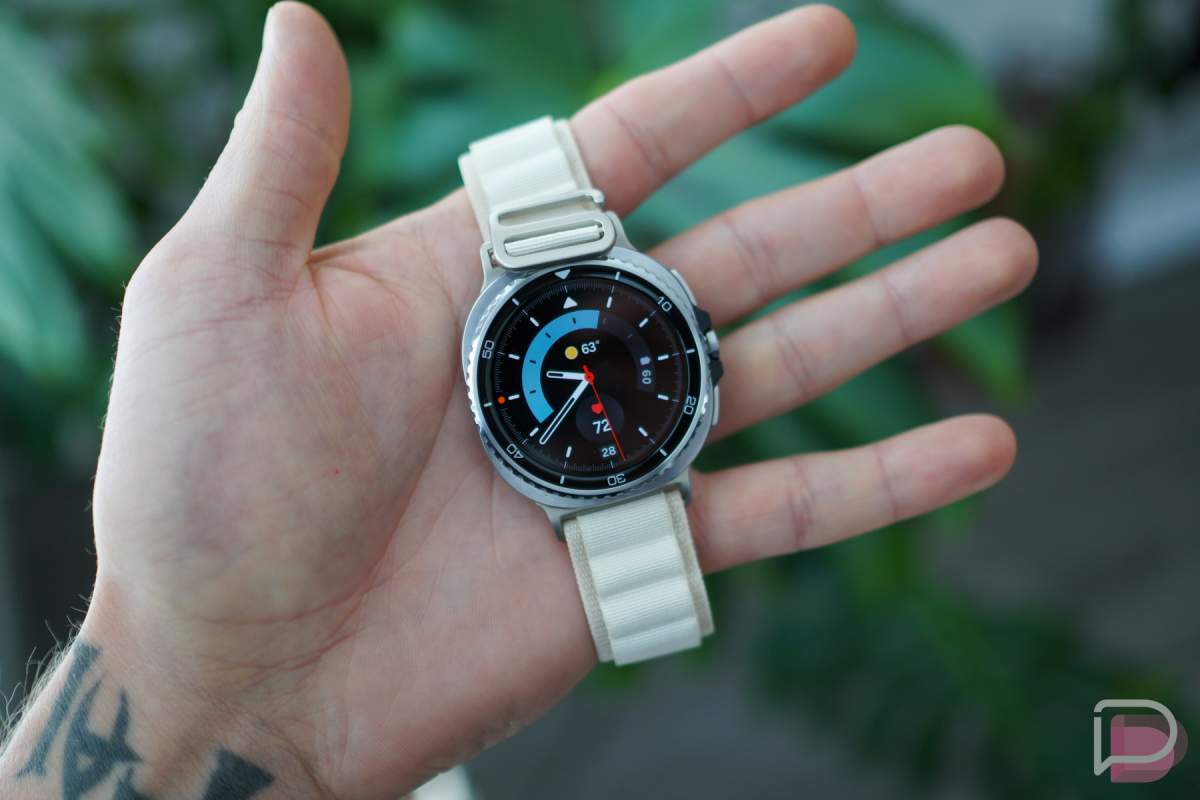
The major One UI 9 update for the Galaxy Watch 8 and Galaxy Watch 8 Classic has begun rolling out in the US. This also includes Wear OS 7 and several new
 Droid Life
The major One UI 9 update for the Galaxy Watch 8 and Galaxy Watch 8 Classic has begun rolling out in the US. This also includes Wear OS 7 and several new features.
The update is hitting US cellular-equipped models as L505USQU3BZJ7 (Watch 8 Classic), L325USQU3BZJ7 (Watch 8, 40mm), and L335USQU3BZJ7 (Watch 8, 44mm)
Some noteworthy changes include a new design and layout in Settings, new watch face discovery, “smarter” watch face recommendations, and easier customization.
Samsung Health is also getting at least 9 changes, including a new Samsung Health mobile app, more intuitive status colors, an enhanced workout experience, cardio load tracking, more tracking to sleep vitals, and a lot more.
Samsung is also improving camera controller options, outdoor navigation safety features, and layouts for notifications and tiles.
It’s a huge update!
Galaxy Wearable app
New design and layout
The watch settings screen in the Galaxy Wearable app has been completely redesigned, making it easier to access the most frequently used features. It also includes a high quality image of your watch with your current watch face.
Discover new watch faces
Finding the right watch face has never been easier. All watch faces have been recategorized with improved descriptions that help you understand the unique benefits of each design. The new watch face gallery makes every watch stand out with large thumbnail images, and you no longer need to tap to see variations. Just swipe left or right on the thumbnail image to explore different colors and styles.
Smarter watch face recommendations
When viewing a watch face, you’ll get recommendations for similar watch faces at the bottom of the screen. You can also select fashion photos to find watch faces that match your personal style. When you search for watch faces, you’ll also get recommendations for designs similar to your current watch face.
Easier watch face customization
The watch face customization screen has been simplified to just two tabs. Change the style of your watch on the Style tab and adjust optional features on the Complications tab. You can see what can be customized all at once and quickly adjust for the perfect look.
Samsung Health
Revamped health metrics design
The main screens for health metrics such as Sleep and Heart health now feature bold circular charts and layouts optimized for your watch, making it easier to grasp key information with a more cohesive and visually appealing experience.
Intuitive status colors
A consistent color system for health status information has been adopted. Clear colors help you quickly identify your current status and easily recognize changes over time.
New mobile app
The redesigned Samsung Health mobile app makes viewing data from your watch easier and more intuitive. You can now customize your home screen by resizing cards. You can also view your data by category, such as Activity, Sleep, Mindfulness, or Nutrition, to more easily check your health status at a glance. New enhanced trend charts let you pinch to zoom, compare, and overlay data to easily track your progress.
More immersive measurements
For key health metrics like heart rate, stress, and body composition, more expressive graphics and dynamic motion have been added to make the measurement process more engaging and intuitive.
Enhanced workout experience
Workouts can now be paused or ended using the Back button for easier control without touching the screen. Larger typography and clearer heart rate zone indicators improve visibility during workouts, making it easier to check key data at a glance even in active environments.
Track your cardio load
See how your workouts and daily activity impact your heart so you can train effectively and reduce the risk of injury. Your target cardio load range adjusts daily based on your recent activity and training focus so you’ll know when to push harder and when it’s time to rest.
Catch changes in your sleep vitals
Your watch can measure your heart rate, heart rate variability, respiratory rate, skin temperature, and blood oxygen while you sleep. After you get your first baseline measurements, your watch will continuously monitor and let you know if there are any meaningful changes.
Manage your heart health
Track the health metrics and lifestyle factors that impact your heart. You’ll get a daily score from your sleep, exercise, BMI, and vascular load that can help you understand your current heart health.
New Health shortcuts
The Health shortcuts tile now supports a broader range of health features, giving you quicker access to more of your health information. New shortcuts include Daily activity, Sleep coaching, Daily cardio load, and more.
Even more improvements
Outdoor navigation safety features
Let your watch help you find your way back. You can set waypoints at your parking spot, camping location, or anywhere else important to you. If you need help finding your way back, your watch will provide directions. You can also use Trackback to record your route and then follow the route in reverse to go back to where you started.
More options for Camera controller
Capture the action from your wrist. Camera controller now supports Food, Portrait video, Slow motion, and Hyperlapse modes. Swipe up from the bottom of the screen to access settings where you can switch between the front and rear cameras and change settings for Motion photo and Flash.
Optimized layouts for notifications and tiles
Notifications have been completely redesigned to help you grasp more content with just a quick glance. Tiles layouts will also adjust automatically whenever you change the font size in your watch’s settings.
To update your Galaxy Watch 8, do the following:
- On your watch, swipe down the top Quick Settings area and tap the Settings icon; you could also swipe up on the app drawer and open Settings
- Scroll down to “Software Update” and tap
- Tap “Download and Install”
- The update will then copy/download to your watch
- Once done, you’ll find “Install” or “Install overnight” options
- Tap “Install” to update and restart your watch
Alternative update method:
- On your phone, open the Galaxy Wearable app
- Tap “Watch settings”
- Scroll to find “Watch software update” and tap it
- Tap “Check for updates”
Let us know if you get it.
NOTE: The global builds for the WiFi models are L320XXU2BZJ7 (Watch 8, 40mm), L330XXU2BZJ7 (Watch 8, 44mm), and L500XXU2BZJ7 (Watch 8 Classic).
Read the original post: Galaxy Watch 8’s Major One UI 9 Update Arrived With 16+ Improvements
// RELATED
 Techmeme
WhatsApp starts letting users schedule messages from 10 minutes to 14 days in advance, in group and individual chats; messages are sent even if the phone is off (Ivan Mehta/TechCrunch)
Ivan Mehta / TechCrunch : WhatsApp starts letting users schedule messages from 10 minutes to 14 days in advance, in group and individual chats; messages are sent even if the phone is off — WhatsApp on Wednesday…
 Techdirt
Daily Deal: MagStack Foldable 3-in-1 Wireless Charging Station with Floating Stand
MagStack is the perfect on-the-go wireless charging station that also transforms into a floating stand for smartphone FaceTime or video playback while charging. This 3-in-1 foldable design enables charging for up to 3…
 Droid Life
I Splurged on This Expensive Pixel 11 Pro Case and It Was Worth It
I’ve been on a bit of a case kick in recent weeks and have tested several on my Pixel 11 Pro. Most have just been your typical case at a ridiculously cheap price that adds questionable levels of protection or looks like…
 Techmeme
Huawei says HarmonyOS has surpassed 100M installations across smartphones, tablets, and PCs, offering 460K+ apps and services from 12M+ registered developers (Iris Deng/South China Morning Post)
Iris Deng / South China Morning Post : Huawei says HarmonyOS has surpassed 100M installations across smartphones, tablets, and PCs, offering 460K+ apps and services from 12M+ registered developers — Huawei…
 Techmeme
Sources: Samsung and SK Hynix agree to adopt parts of YMTC's "Xtacking" tech for 3D NAND flash via cross-licensing deals, signaling YMTC's rapid tech progress (Nikkei Asia)
Nikkei Asia : Sources: Samsung and SK Hynix agree to adopt parts of YMTC's “Xtacking” tech for 3D NAND flash via cross-licensing deals, signaling YMTC's rapid tech progress — TAIPEI/PALO ALTO/SEOUL…
 Techmeme
Asian tech stocks tumble, led by Japanese chip stocks, after a US tech sell-off; Advantest falls 12%+, Tokyo Electron 7%+, Samsung and SK Hynix 6%+ (Lee Ying Shan/CNBC)
Lee Ying Shan / CNBC : Asian tech stocks tumble, led by Japanese chip stocks, after a US tech sell-off; Advantest falls 12%+, Tokyo Electron 7%+, Samsung and SK Hynix 6%+ — Asian technology stocks tumbled…